



In 2026, live streaming continues to grow in popularity. From gaming and podcasting to online teaching, live events, and business content, streaming has become a powerful means of reaching audiences. Whether you’re a beginner or a professional, choosing the right streaming software is one of the most important decisions you can make.
There are many streaming software programs available now, each offering different features, price points, and ease of use. Some are free and open-source. Others offer cloud-based simplicity or full studio production tools. This guide breaks down the top options in 2026, explains who they are best for, and includes accurate pricing to help you make the right choice.
Streaming Software Comparison Table
| Software Name | Free Version Available | Paid Plan Cost (USD) | Platforms | Ease of Use | Best Suited For |
|---|---|---|---|---|---|
| OBS Studio | Yes | Free only | Windows, Mac, Linux | Medium | All levels of streamers |
| Streamlabs Desktop | Yes | $27 monthly or $189 yearly | Windows, Mac | Easy | Gamers and beginner creators |
| XSplit Broadcaster | Yes | $15 monthly or $60 yearly | Windows only | Medium | Semi professional streamers |
| vMix | Yes (limited) | $60 to $1200 one-time or $50 monthly | Windows only | Complex | Studios and pro video teams |
| Wirecast | Trial only | $495 or $995 one-time | Windows, Mac | Complex | Broadcast-level production |
| Lightstream | Trial available | $7 to $20 monthly | Browser-based | Very easy | Console users and light streamers |
| Restream Studio | Yes | $19 to $237 monthly | Browser-based | Very easy | Multistreaming and webinars |
| Twitch Studio | Yes | Free only | Windows, Mac | Semi-professional streamers | Beginner Twitch streamers |
| Ecamm Live | 14-day trial | $20 or $40 monthly | Mac only | Easy | Mac users and interview creators |
OBS Studio

OBS Studio is a completely free and open-source platform that works on Windows, Mac, and Linux. It gives users the ability to create high-quality broadcasts using multiple video and audio sources, custom scenes, and filters. There are no hidden costs or locked features. While the setup can be overwhelming for new users, OBS is one of the most powerful tools for those willing to learn. It is suitable for everything from casual streaming to full production-level content.
Streamlabs Desktop

Streamlabs Desktop is based on OBS but built to be more user-friendly, especially for streamers who want a fast and easy start. It includes free overlays, alerts, and templates to help create professional-looking streams with minimal effort. The core version is free, but many premium features like multistreaming, extra themes, and cloud backup are part of Streamlabs Ultra, which costs $27 per month or $189 per year. This tool is great for gamers and content creators who want a polished look without building scenes from scratch.
XSplit Broadcaster

XSplit Broadcaster is designed for Windows users and offers both a free and paid version. The free version adds a watermark and limits some features, while the premium version costs $15 per month or $60 per year. A lifetime license is also available for $200. It offers an intuitive layout editor, audio mixer, and support for various capture cards. It’s well suited for creators who want professional output without diving too deep into complex setups.
vMix

vMix is one of the most powerful streaming platforms available in 2025. It is designed for Windows users who need studio-grade tools. The software comes in different editions. The basic HD version starts at $60, while the Pro version with full 4K support and advanced replay features goes up to $1200. There is also a monthly subscription called vMix Max, which costs $50 per month and gives access to the full feature set. This tool is ideal for churches, live sports, events, and high-end broadcasts.
Wirecast
Wirecast is a premium streaming software made by Telestream. It works on both Mac and Windows and is popular in professional broadcasting environments. There are two main versions: Wirecast Studio costs $495 and includes multi-camera support, transitions, and overlays. Wirecast Pro costs $995 and adds features like instant replay, ISO recording, 3D virtual sets, and support for SDI input. Wirecast is built for advanced users and live event professionals who need reliable, studio-level control.
Lightstream
Lightstream is a cloud-based streaming platform that runs directly in your browser. There is no need to install software, making it ideal for streamers who want to go live quickly. The Gamer plan starts at $7 per month and is perfect for Xbox and PlayStation users. The Studio plan starts at $20 per month and includes more creative control, layouts, and guest support. Lightstream is extremely simple to use and best for those who want a fast setup and cloud convenience.
Restream Studio
Restream Studio is another browser-based solution that focuses on multistreaming. With Restream, you can go live on Facebook, YouTube, Twitch, LinkedIn, and more at the same time. The free version allows limited destinations, while paid plans start at $19 per month and go up to $237 per month depending on team size and advanced features. It offers screen sharing, chat integration, branding tools, and Full HD output. Restream is ideal for podcasters, marketers, and anyone looking to reach more viewers with less effort.
Twitch Studio
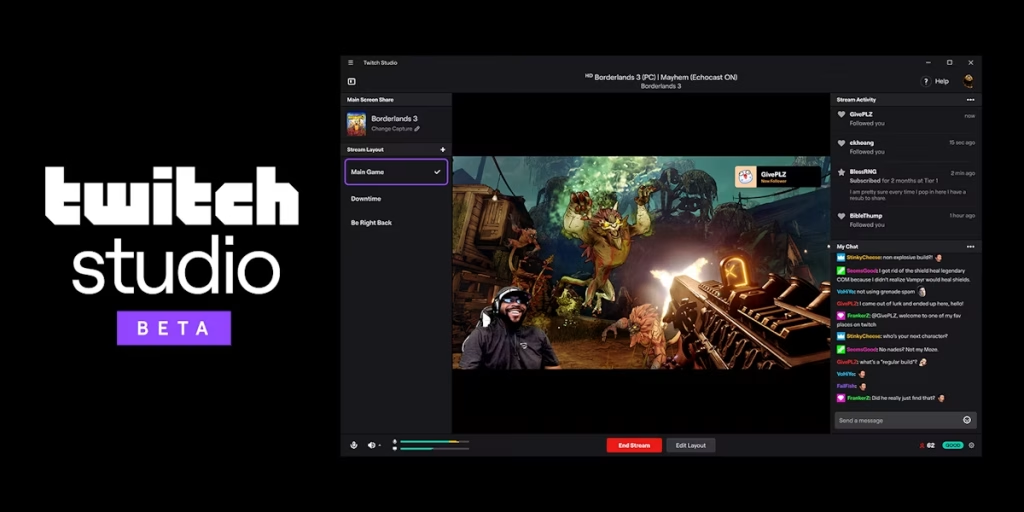
Twitch Studio is the official software provided by Twitch. It is free and designed for beginners. It offers guided setup, built-in overlays, and easy connection to your Twitch account. It is simple, effective, and made for those who are streaming only to Twitch. It lacks support for multistreaming or custom plugins but is a great place to start for first-time streamers.
Ecamm Live

Ecamm Live is exclusive to Mac and offers a smooth, polished experience for solo creators, educators, and interview-style streamers. The Standard plan is $20 per month and covers the basics, while the Pro plan at $40 per month includes features like interview mode, virtual camera, audio filters, and multistreaming. The user interface is friendly, and the output quality is excellent. It is especially popular among Mac users who want to create high-quality content for YouTube, Facebook, or their platforms.
If this article helped you, please consider supporting our work. Every small contribution keeps Abijita.com independent and running.

Key Points
- If you want a powerful tool with no cost, OBS Studio remains the best option. It is open-source, flexible, and trusted by streamers at all levels. It does require some learning, but there are no paywalls.
- If you are a new streamer who wants something that looks great out of the box, Streamlabs Desktop is the top choice. It is especially good for gamers who want easy overlays and alerts with less setup time.
- Lightstream is the best pick for console streamers or anyone who wants to stream without downloading any software. It runs in your browser and offers excellent ease of use.
- For people who need to stream on multiple platforms at once, Restream Studio is the most convenient tool. It is perfect for webinars, podcasts, and growing audiences across social channels.
- If you are working on live events, church services, or large productions, vMix and Wirecast offer the deepest feature sets. vMix provides more flexible pricing, while Wirecast is the right choice for high-end broadcast quality.
- Twitch Studio is ideal for first-time streamers who are focused only on Twitch. It is simple and takes care of everything a beginner might need.
- Mac users looking for a professional solution will find Ecamm Live to be the best option. It is smooth, polished, and packed with features for creators, educators, and podcasters.
Each of these platforms shines in different areas, and the best streaming software depends on your needs, budget, and skill level.







