


Have you ever searched for a smartphone on an online shopping website, closed the tab, and then started seeing advertisements for the same phone while reading the news or browsing social media? It can feel as though websites are following you around the internet. In many cases, cookies and other tracking technologies help make that happen.
Cookies are a fundamental part of how the modern web works. They allow websites to remember login sessions, save shopping carts, store preferences, and understand how visitors interact with their pages. However, not all cookies serve the same purpose. Some are created by the website you are visiting, while others come from external services embedded in that website.
These are known as first-party and third-party cookies. Although both are stored in your browser, the way they work, the information they can access, and the privacy concerns they raise are quite different.
What Are Website Cookies?
Cookies are small pieces of data that websites ask your browser to store. When you visit a website, its server can send instructions to your browser to save a cookie. On subsequent visits or requests, the browser can send that information back to the relevant website.
This allows websites to recognize information about previous visits without requiring users to start from scratch every time they open a page.
For example, imagine visiting an online shopping website and adding a pair of headphones to your cart. You decide not to buy them immediately and close the browser. When you return later, the headphones may still be waiting in your shopping cart. A cookie may have helped the website remember your shopping session.
Cookies can also keep users signed in, remember language preferences, maintain website settings, and support analytics and advertising services.
The two main categories discussed in online privacy are first-party cookies and third-party cookies. The distinction depends on the relationship between the cookie’s domain and the website currently displayed in the browser.
What Are First-Party Cookies?
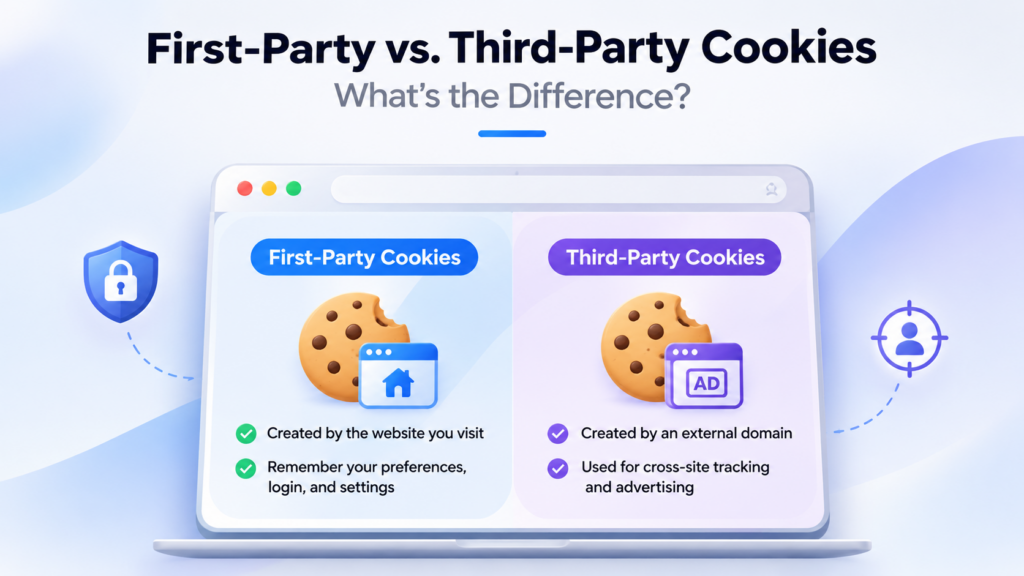
First-party cookies are associated with the website you are directly visiting. They are generally created by that website’s domain and used to remember information about your interaction with it.
Consider visiting an online store to purchase a laptop. You sign in to your account, browse different product categories, and add a laptop to your shopping cart. First-party cookies can help the website maintain your login session and remember the items you selected as you move between pages.
The next time you visit, the website may also remember your preferred language, region, or other settings.
News websites use similar techniques to remember certain preferences, while online services may rely on cookies to maintain authenticated sessions and provide personalized features.
First-party cookies are also used for website analytics. They can help website owners understand which pages receive the most visits, how users navigate between sections, and whether visitors return to the website.
For website operators, these cookies are particularly useful because they support essential functionality and help improve the overall browsing experience.
However, first-party cookies are not automatically harmless. Websites can also use them to collect information about visitor behavior, measure advertising performance, and support marketing activities. What happens to the collected information depends on the website’s implementation and privacy policies.
What Are Third-Party Cookies?
Third-party cookies are associated with a domain different from the website currently displayed in your browser. They are commonly introduced through external content, advertising networks, tracking services, and embedded features.
To understand how they work, imagine visiting an electronics store to compare smartphones. The website displays advertisements supplied by an external advertising network, which uses a cookie associated with its own domain.
Later, you visit a technology news website that uses the same advertising network. When the advertising service loads on that page, your browser may send the previously stored cookie, provided its privacy settings allow it.
The advertising network can then recognize the same browser and use that information to help select advertisements related to your earlier shopping activity.
This is one reason advertisements sometimes seem unusually familiar. The advertising company may have received browsing signals from several websites that use its services.
Third-party cookies have traditionally been used for behavioral advertising, cross-site tracking, advertising campaign measurement, and certain embedded services.
The technology is not inherently malicious. The privacy concern is that information about browsing activity can be collected by companies users may never have directly visited or knowingly interacted with.
First-Party vs. Third-Party Cookies: Key Differences
Although both types of cookies are stored in your browser, they differ in their origin, purpose, and ability to support tracking across websites.
| Feature | First-Party Cookies | Third-Party Cookies |
|---|---|---|
| Created by | The domain associated with the website you visit | A different domain loaded or accessed in the website’s context |
| Main purpose | Remember preferences and support website functionality | Support cross-site services, advertising, and tracking |
| Tracking scope | Primarily associated with the website being visited | Can recognize browsers across multiple participating websites |
| Common uses | Login sessions, shopping carts, language settings | Targeted advertising, cross-site tracking, campaign measurement |
| Data collection | Records activity and preferences associated with the website | Can receive browsing signals from different websites |
| Who uses them? | Website owners and their services | Advertising networks, external services, and tracking providers |
| Privacy concerns | Depends on how the website collects and handles information | Greater potential for cross-site profiling |
| Browser restrictions | Generally supported, subject to browser policies | Frequently restricted, partitioned, or blocked |
| Example | A shopping website remembers your shopping cart | An advertising network recognizes your browser on multiple websites |
| Can users delete them? | Yes | Yes |
| Are they essential? | Often used for important website features | Usually associated with external services, advertising, or analytics |
The simplest way to remember the difference is that first-party cookies help the website you are visiting remember information about you, while third-party cookies have traditionally allowed external services to recognize your browser across different websites.
How Do Third-Party Cookies Track You Across Websites?
Cross-site tracking is one of the main reasons third-party cookies have attracted attention from privacy experts and browser developers.
Imagine visiting three websites during the same afternoon. First, you browse an online store looking for a new laptop. Next, you visit a technology news website. Finally, you open a travel website to compare flight prices.
Each website may display advertisements supplied by the same advertising company. When the relevant advertising service loads, it may be able to recognize a cookie previously stored in your browser.
If the browser allows this access, the advertising company can associate activity from different participating websites with the same browser identifier.
Over time, these signals can help advertisers build an advertising profile based on browsing interests and use it to select relevant advertisements.
This does not necessarily mean the advertising company knows your real name or identity. A cookie generally identifies a browser or stored identifier rather than directly identifying a person. However, identifiers can sometimes be combined with other information to build more detailed profiles.
It is important to understand that third-party cookies are only one tracking method. Websites and advertising companies also use tracking pixels, device identifiers, server-side tracking, and other technologies.
Why Are Third-Party Cookies Becoming Less Common?
For years, third-party cookies played an important role in the online advertising industry. Advertising companies relied on them to recognize browsers across websites, personalize advertisements, and measure campaign performance.
However, their ability to connect browsing activity across different websites has raised significant privacy concerns. Users may not always know which companies are collecting their information or how long that information is retained.
Browser developers have responded by introducing stronger privacy protections and restricting access to third-party cookies.
Safari uses Intelligent Tracking Prevention to block third-party cookies by default. Firefox also blocks cross-site tracking cookies by default through its Enhanced Tracking Protection features. Google Chrome provides controls to allow or block third-party cookies, with them blocked by default in Incognito mode.
These differences matter because third-party cookies do not behave identically across browsers. Some websites may also experience problems when external services depend on cookies that the browser blocks.
The changes have pushed advertisers and website owners to explore alternative approaches, including first-party data collection, contextual advertising, and privacy-preserving advertising technologies.
However, restricting third-party cookies does not eliminate online tracking. Other technologies can still collect information about browsing activity, depending on how websites and services are configured.
Are First-Party Cookies Safer Than Third-Party Cookies?
Generally, first-party cookies present fewer cross-site tracking concerns because they are associated with the website you are visiting. They also support features that users expect, such as staying signed in and retaining shopping cart information.
Third-party cookies introduce additional privacy considerations because external companies may use them to recognize browsers across multiple websites.
But the distinction should not be confused with a guarantee of safety. A first-party cookie can still collect browsing information, and a website may share information with external analytics or advertising providers.
The important question is not simply whether a cookie is first-party or third-party. It is what information it collects, why it collects that information, and how that data is stored or shared.
How Can You Manage Cookies in Your Browser?
Modern browsers provide settings that allow users to control how websites store and access cookies. Depending on the browser, you can delete existing cookies, block third-party cookies, or clear stored data for individual websites.
In Google Chrome, you can open Settings, go to Privacy and security, and select Third-party cookies. From there, you can review the available options for allowing or blocking third-party cookies.
Firefox and Safari also include privacy protections designed to limit cross-site tracking. Their settings and technical approaches are different, so the available controls depend on which browser you use.
You should also remember that blocking all cookies can affect normal website functionality. Some websites may stop remembering your login session, shopping cart, or language preferences.
If this article helped you, please consider supporting our work. Every small contribution keeps Abijita.com independent and running.

Blocking third-party cookies is a more targeted way to reduce certain forms of cross-site tracking while continuing to use first-party cookies for everyday website features.
First-party and third-party cookies are both important parts of the web, but they serve different purposes. First-party cookies allow websites to remember your preferences, maintain login sessions, and provide a consistent browsing experience. Third-party cookies have traditionally enabled external companies, particularly advertising networks, to recognize browsers across multiple websites.
That is why an online store can remember the products in your shopping cart, while an advertising network may show you advertisements for similar products on an entirely different website.
As browser developers strengthen privacy protections, the role of third-party cookies continues to change. However, cookies are only one part of the broader online tracking ecosystem, and understanding how websites collect and use browsing information remains important.