



Did you know that you can play a fun little version of Squid Game right inside your Google Chrome browser?
Whether you’re using your mobile phone or browsing on your computer, you can dive into this interactive easter egg and experience a playful nod to the hit Netflix series.
Here’s how you can do it:
- Open Google Chrome:
- On your mobile phone or computer, open the Chrome browser.
- Search for “Squid Game”:
- Type Squid Game in the search bar and hit Enter.
- Interact with the Characters:
- A mini Squid Game-themed animation featuring the iconic doll and masked guards will appear at the top of your search results.
- On mobile or web, tap or click to interact with the characters.
- Enjoy the Game:
- Clicking the characters will trigger animations and interactive visuals. It’s a lighthearted homage to the show and a fun way to pass the time.
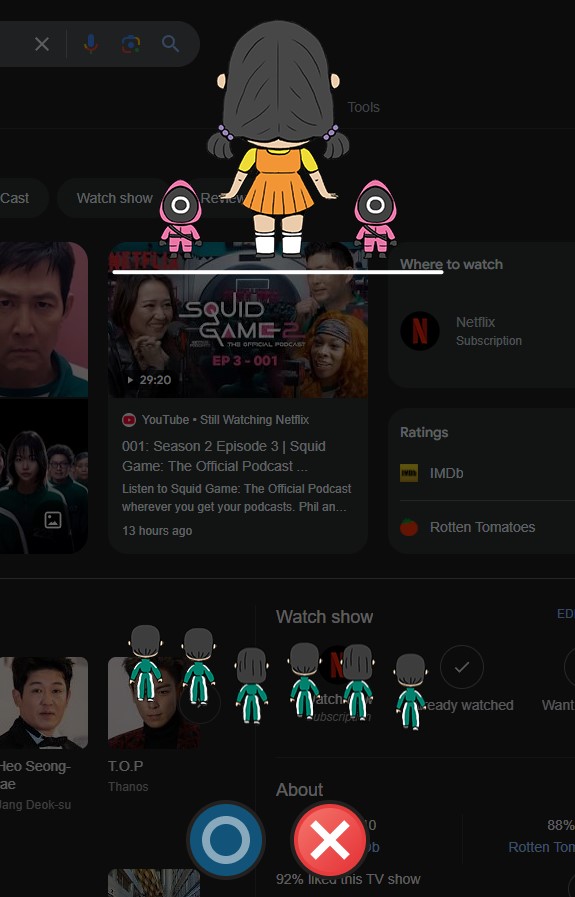
Whether you’re a fan of the show or just curious, this is a great way to enjoy a small piece of the Squid Game universe. It’s easy, free, and brings a bit of excitement to your regular browsing routine.
So, what are you waiting for? Open Google Chrome, search for “Squid Game,” and let the game begin!
If this article helped you, please consider supporting our work. Every small contribution keeps Abijita.com independent and running.